
Fiber, Finally!

A New Technology For These Parts

Yes, it’s here: fiber internet.  Well, it’s been here locally for just more than a year, but I didn’t want to be a guinea pig.  Yesterday afternoon I helped (debatable) the fiber technician install a five hundred foot cable along three telephone poles to get from the junction box to my house.  It was about 100F outside, but he is young and quite a trooper.  Very polite and professional, too.  His fiance stopped by to bring him some food and drinks.

I say “helped” him install the cable but it’s more like I tried to help.  That cable has a fiber optic and a steel wire inside, and it is very springy.  I did my best, but some of the inner loops started coming out of the coil and it took us another thirty minutes to untangle the mess.  He said those longer coils of cable tend to get messy like that, though.  In the end, I gave him a $40 tip for his troubles.

Glad I finally made the switch to fiber.  The biggest plus so far is the symmetrical bandwidth.  No more 20 megabit upload restrictions, which means this goofy website loads faster, too.  Hopefully it will be more future-proof and reliable than the old coaxial cable network.

Canceling a Flaky Cable ISP

Today it was like pulling teeth trying to cancel the cable internet service provider (ISP).  But they have been getting my money for a long time, so I don’t feel too bad. I figure $50 per month on average for tweny years comes out to $12,000.  Yeah, not too bad at all.  The customer support rep did his level best to sweeten the pot to get me to stay, and I almost took him up on it.  After all, having redundant internet would be nice, right?

However, they have kind of been falling down on the job a bit lately in regards to their line quality.  I have had at least three visits from technicians and maintenance in the past year.  When the city moved some telephone poles in the neighborhood a couple years ago, they just kind of stretched the coax line from my house to the new pole, without replacing it.  Then, last summer, a maintenance worker disconnected my drop line during the day (I was in a work meeting) to relieve some of the tension.  When I went outside to see what was going on, he told me I had to call another technician to get it fixed.  I set up said appointment; the next guy (tatted up, kind of an atitude) came and said he couldn’t fix it because he didn’t have a bucket truck or a long enough ladder, but said it was probably fine as-is.  He also said the maintenance crew are kind of jerks.  Infighting in the ranks, well that’s typical I guess.  But it was working fine so I didn’t sweat it too much.

Several months go by, and a maintenance crew drives by in a bucket truck, sees the situation, and proactively adds an extension to my drop cable.  This is great, I think.  However, it stopped working after an hour and the crew was nowhere to be seen.  So, another call to tech support to schedule a fix.  Meanwhile my internet is down the rest of the workday, and overnight as well.

A new technician the next day, but I can tell he’s at least got his act together.  Despite not having a bucket truck, he gets right up on the pole with a hook ladder and digs into the situation.  He quickly discovers that the drop line extension they added the day before had a “suck out”.  He cut off the bad connector and showed it to me.  There was a single strand of the shielding mesh wire wrapped around the central copper conductor lead!  And this guy proactively goes to the supply shop, gets a full spool of reinforced coax, and puts a completley new drop line in from my house to the pole.  Finally, some good service!

It has been at least six months or more since the new drop line was installed.  You’d think that would have been the end of the saga, but sadly no.  Last week I get a voicemail from the ISP saying there is yet an issue on my line, requiring a visit from a technician.  I called them to enquire: apparently they are doing “proactive” line monitoring now (like they haven’t been doing anything proactively for years), and they had detected noise on my circuit.  I told them about the string of technicians I’ve already had, and could I just keep going as is?  To that I was told they may have to put a block on the line.  So now I’m actually kind of mad.  I tell him I’ll have to think about it, but my mind was made up at that point it was time to switch to fiber.

I will leave the coax lines in place in case I have to go back to cable, but I hope that day doesn’t come at this point!  Incidentally, I also use this ISP for my mobile telephone service, and will probably keep that.  At least they support the Apple Watch, whereas my previous cellular company couldn’t even muster that.
96GB Baby Yeah!

I love still being able to find great deals on eBay.  96GB of registered DDR3 ECC server RAM for this puppy for $60.

$ free
total used free shared buff/cache available
Mem: 98977220 917168 80307740 30456 17752312 97159472
Swap: 46874620 0 46874620


Seagate Still Sucks

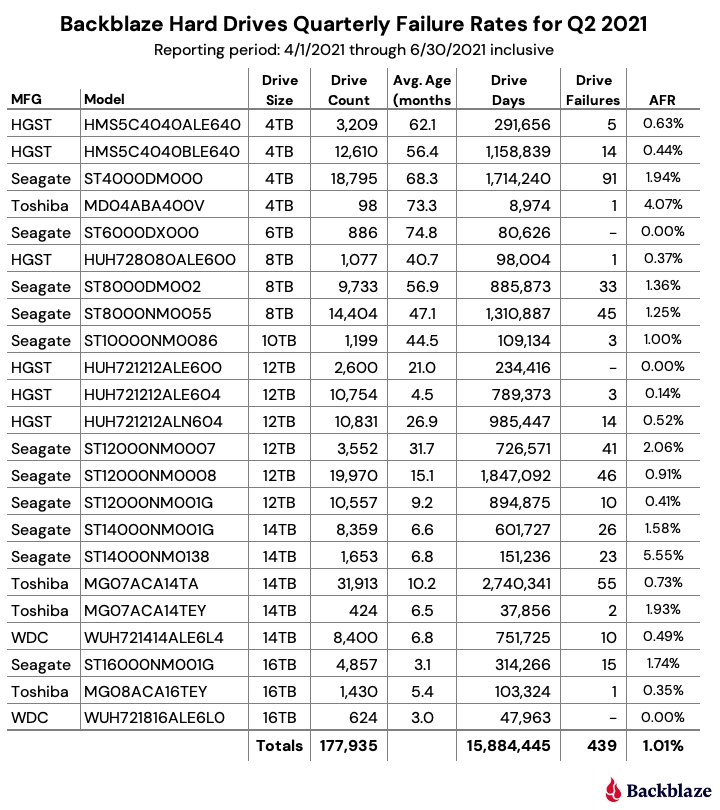
Seagate contiues to have pretty much the worst average failure rate of all drives in the Backblaze fleet.  HGST still one of the best.  You know which ones I will keep using!

https://www.backblaze.com/blog/backblaze-drive-stats-for-q2-2021/

CPU Upgrade

Today I upgraded the server to dual Intel Xeon X5650 hex core CPUs.  I was waiting on some actively cooled LGA1366 (Socket B) heat sinks, which I found for cheap on eBay, but they had to come from China.  For some reason, probably because they are old tech, the LGA1366 Xeon specific coolers are hard to find these days.  Noctua still makes a great unit, but it costs about $55 USD each.  Plenty of used Core i7 LGA1366 coolers with the pop-in mounts, but few for the Xeons with their screw-in mounts.  I wish Intel would stick with some kind of cooling mount standard for a long while.  That’s one area that AMD has them beat for sure.

The old L series CPUs were limited to 40W TDP and the passive heat sinks included with the motherboard worked fine, even under 100% CPU stress testing.

Server Upgrade

Today I upgraded the base hardware of this server to a dual Intel Xeon L5630 quad-core with 96GB of RAM.  The storage remains the same as before.

That old dual Opteron 285 motherboard was still working just fine, but I just felt like having a more powerful system with six times the RAM!!

HP Envy Upgrades

I made a few modifications to this primo HP Envy computer:

  • Upgraded CPU to Intel Core i5-3330s
  • Upgraded RAM to 16GB of Crucial PC3-12800
  • Installed 3TB HGST Deskstar in the caddy I bought on eBay

Tested the ram RAM: three passes of MemTest86+ with no errors.

I am pretty impressed with the build quality of this PC.  Still can’t believe someone dropped it off at Goodwill…

Goodwill Hunting

My old friend from grade school days is a thrift store superstar.  He finds all kinds of treasures that you would never imagine at Goodwill and other second-hand shops.  Over the past year or so, sometimes I will take him and another old friend, Jeff, on what we call “Shopping Safaris” where we hit all the Goodwill stores in the Tri-City area.

Today was such a day.  We started off with a great breakfast at Denny’s including plenty of caffeine and protein.  Next stop was the Goodwill in Richland.  I always head to the electronics section first, so I did.  I saw what looked like a computer monitor and went in to check it out.  Turns out it was an HP Envy 20 All-In-One computer with a price tag of only $30.  Plugged it into the power supply and hit the power button.  Wouldn’t boot because likely it had no operating system or even hard disk.  But the screen looked great and everything else looked to be in good shape as well.  So I bought it, of course!  Also on the Safari I picked up some nice art including a couple of paintings, some solid brass sailboat sculptures, and other decor.

After returning home from the Safari, I tore into the HP and installed an mSATA SSD,  a straight old 2.5 inch SSD, and some extra RAM I had laying around.  The hard drive caddy was missing, so I ordered one of those on eBay for about seven dollars.  But the SSD is light enough to be held in place by the connector alone, so I just buttoned it all back up.  Linux was already on the mSATA from a previous notebook SSD upgrade I did a few days ago.  To my pleasant surprise, it all booted up and works just fine.  Even the touch screen driver modules seem to have been automatically detected and loaded by Ubuntu.  I am writing this post on the computer right now, in fact.

Also ordered a Core i5 CPU upgrade on eBay, since it only has a Core i3.  I may also order 2x8GB SODIMMs to boost the RAM.  Right now it “only” has 8GB, which is plenty, but I like to max RAM out whenever possible.  Searching for complete HP Envy 20 computers on eBay, they seem to be running anywhere from $250 to $300.  So today was some really great Goodwill hunting!!

Seagate = Shit

I will never buy another Seagate hard drive again.  In the past few months, I have had to replace several of them in my home computer systems.  And these weren’t grizzled veteran drives with years of use under their belt.  No, these were relatively new, yet suddenly developed unrecoverable sector errors and other SMART detected problems.

In the past twenty years I have been building various systems ranging from simple home user desktops to multi-disk multi-CPU severs, Seagate (at least their “desktop” line of drives) ranks up their with the IBM DeskStar (aka DeathStar) and Western Digital Caviar “Green” drives in terms of shittiness.  These drives share a cold place in the Hall of Shame.

Time was a Seagate SCSI drive was a “gotta have” piece of equipment for building a good computer.  I think it started going downhill when they bought out Maxtor, and starting slapping the Seagate label on those drives.

A couple years ago I came across a report by BackBlaze or some other major cloud storage provider.  The paper presents their statistical findings of various brands of hard drives and failure rates.  Based on their experience with tens of thousands of hard drives, the report indicated that Hitachi Global Storage Technologies (HGST) were the most reliable.

Since then, I have been putting HGST “Ultrastar” SATA and SAS drives in my servers, and have been really pleased.  Even “refurbished” drives with several years of runtime have been more reliable for me than Seagate drives.

Recently, Western Digital acquired HGST.  Last year, they announced they will drop the HGST branding and incorporate those products under the WD product line.  I truly hope they maintain the same (or better) level of quality.  I guess time will tell.  In the meanwhile, I’m stocking up on extra HGST Ultrastar drives where I can from eBay and other vendors.